Saturday, August 17, 2013
Online Play Lag Issue
The current version is using P2P communication.
And I realize there can be a significant lag if one entity network speed (ping time) is slow.
I'm trying to adopt a different technique (move prediction) to address this issue.
Please stand by...

Monday, August 12, 2013
Released Google+ Online Battle!
Hi, I've released online battle feature through Google Play Service today!
Please make sure to use WIFI connection for the best performance.
It's working even through Phone Carrier's network such as Verizon or ATT but from my testing, it was really slow.
In online battle, you can choose to play against "auto selected" player or a friend in Google+ circle through invitation.
Note: unless they both link in Google+ circle, you won't get notified when other player sends an invitation.
Monday, July 22, 2013
Next Update - Network Play
Hi, I'm back :) and currently working on CPS2HD netplay features.
I'll be using Google Play Service API and will match players through Google+ account.
So, get ready for the next update and please join the room to play with others.
Sunday, August 28, 2011
v4.0.0 Update
* v4.0.0 update
1. Better touch control and Honeycomb support (fix multitouch crash and network play issue).
2. Select Limit option under frameskip menu if game runs too fast.
3. Resize and position the game screen anywhere on the screen.
4. Resize and drag/drop the UI control icons anywhere on the screen.
5. Overlap two (or more) UI control icons to perform one-touch multi-buttons.
And cleaned up unnecessary menus.
* i will have a donator version ready in couple days and will notify through email :)
1. Better touch control and Honeycomb support (fix multitouch crash and network play issue).
2. Select Limit option under frameskip menu if game runs too fast.
3. Resize and position the game screen anywhere on the screen.
4. Resize and drag/drop the UI control icons anywhere on the screen.
5. Overlap two (or more) UI control icons to perform one-touch multi-buttons.
And cleaned up unnecessary menus.
* i will have a donator version ready in couple days and will notify through email :)
Monday, November 1, 2010
UI design
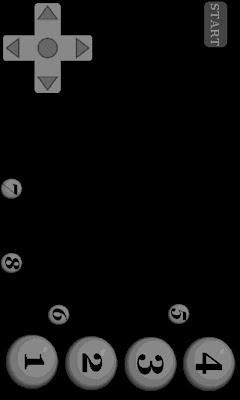
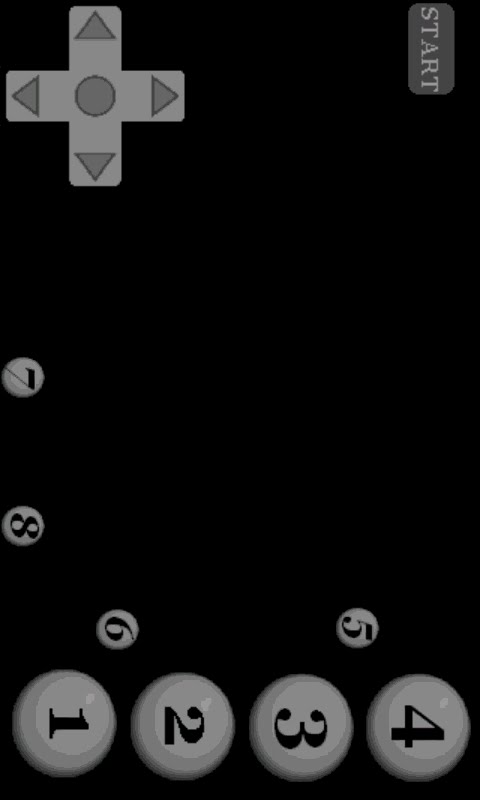
Hi, I'm getting a mix feedback from different users on the new UI design.
Some folks like it very much but some doesn't like it at all... :(
Besides UI skin, if you have a better idea on layout or functionality, please post it here!
Some folks like it very much but some doesn't like it at all... :(
Besides UI skin, if you have a better idea on layout or functionality, please post it here!
Tuesday, October 26, 2010
ver 3.5.0 donator version
3.5.0 donator version got sent out today!
If you're a donator but didn't receive an email from me, please send me an email with your name and donation account (paypal or google) to verify.
For next release, I'll try to send it out to the donator list first, then get some feedback before releasing to the market.
If you're a donator but didn't receive an email from me, please send me an email with your name and donation account (paypal or google) to verify.
For next release, I'll try to send it out to the donator list first, then get some feedback before releasing to the market.
Friday, October 22, 2010
ver3.5.0 update
** Donation version update will also get sent out in ~3 days.
-Add new UI control skin
-Add touch button mapping
* you can change the button mapping in the option.
* if you want the old style UI, please select "onScreen Control UI" to Classic and "Screen Resolution" to Full Screen.
=========================
If you want to change or have a better idea on UI design, please comment at here :)
-Add new UI control skin
-Add touch button mapping
* you can change the button mapping in the option.
* if you want the old style UI, please select "onScreen Control UI" to Classic and "Screen Resolution" to Full Screen.
=========================
If you want to change or have a better idea on UI design, please comment at here :)
Friday, October 8, 2010
donation version (for those can't access paid apps)
CPS2HD is back in the market place!
If you can't access to CPS2HD in the market place, donation version (paypal/google checkout $5) is available.
Please email me (jrioni@gmail.com) for details.
===========================
For those who already donated, please send me an email with the following info.
-Full Name
-Paypal or Google checkout
For future update, I won't make the copy available publicly instead, will send out to these email list.
If you can't access to CPS2HD in the market place, donation version (paypal/google checkout $5) is available.
Please email me (jrioni@gmail.com) for details.
===========================
For those who already donated, please send me an email with the following info.
-Full Name
-Paypal or Google checkout
For future update, I won't make the copy available publicly instead, will send out to these email list.
Saturday, August 14, 2010
V3.3.0 Update
* V3.3.0 Update *
-Add Bluetooth support
(please let me know if WiiMoteController works on EVO with this update)
-Add Trackball support (=P1)
-Add P1/P2 start under the menu
* Instruction *
Please go to the donation version section and download cps2hd.apk to reinstall.
If you have cps2hd installed already, it'll reinstall and doesn't require new activation.
-Add Bluetooth support
(please let me know if WiiMoteController works on EVO with this update)
-Add Trackball support (=P1)
-Add P1/P2 start under the menu
* Instruction *
Please go to the donation version section and download cps2hd.apk to reinstall.
If you have cps2hd installed already, it'll reinstall and doesn't require new activation.
Monday, June 28, 2010
HowTo Port Forwarding
First make sure you're connected to Wifi.
To find your ip address, click "Network Play-Wifi Buddy" and select Player 1.
It will print out your ip address and hit cancel.
Now, you need to configure your wireless router to forward the port 9919 to this ip address.
Here is a useful youtube video
http://www.youtube.com/watch?v=1DSDbvtVIaA (only need to watch till 1:20)
or
http://www.youtube.com/watch?v=-J0a6xDWCQo
If you have more than one wifi device, your ip address can be changed next time you connect. So, it' better to assign/lease a static ip address to your phone.
To find your ip address, click "Network Play-Wifi Buddy" and select Player 1.
It will print out your ip address and hit cancel.
Now, you need to configure your wireless router to forward the port 9919 to this ip address.
Here is a useful youtube video
http://www.youtube.com/watch?v=1DSDbvtVIaA (only need to watch till 1:20)
or
http://www.youtube.com/watch?v=-J0a6xDWCQo
If you have more than one wifi device, your ip address can be changed next time you connect. So, it' better to assign/lease a static ip address to your phone.
Wednesday, June 23, 2010
CPS2HD + Wiimote Controller
There is a free app called wiimote controller which lets you use wii controller over the bluetooth.
I tried it myself and it worked great! Highly recommending!
Thanks to Droiddoc97, here is youtube video demo.
http://www.youtube.com/watch?v=afgNzzqrKdI
I tried it myself and it worked great! Highly recommending!
Thanks to Droiddoc97, here is youtube video demo.
http://www.youtube.com/watch?v=afgNzzqrKdI
v3.0.0 update + CPS2HD Wifi Online Play
v3.0.0 update details.
-Add a confirmation dialog for "back" button
-Add pause/resume functionality for "home" button
-Add online battle
Here is an instruction for the online battle
* setup *
1. enable wifi on your phone
2. find your mac address (eg. Setting->About Phone->Status or Hardware information)
3. have your wireless router to assign/lease a static ip address to this mac address
4. have your wireless router to forward port number 9919 to the ip address assigned from step #3.
For help, please search 'port forwarding' in Google or YouTube.
Once you're connected to the server, you have two menu options.
1. Create Room - let you create a game room for other player to join
* you can define a list of different games you'd like to play and let other player to choose the game
For example, you can enter "ssf2 csclub mvscj"
Player who wants to challenge you will notify you with one game. (eg. "mvscj")
After creating a room, you can press "home" button and do other stuff.
It will wait in a background process and notification will pop up when other player wants to join.
You can either "accept" or "decline" the challenge.
Once you accept (or being accepted) the challenge, please load the game rom that's hand-shaked between two players (eg. "mvscj").
During the game play, you can send a message from the menu option.
When you finish playing the game, press "back" button to exit.
Before exiting the game, if they wish, two players can exchange a message for the next game to play (eg. csclub) and simply, press "back" button to finish the current game and load the next rom file to play again.
2. Refresh Screen - check server for an update
** please note that online mode is still in a beta phase so, please have the right expectation :)
** it uses p2p connection so, try to play with a player close by your region to reduce the frame delay.
** if you have Nexus One and put your hand on top side of the phone, it will somehow impact wifi performance, very strange :( So, please try to hold it with your fingers to make a space in between or use Wii controller :)
-Add a confirmation dialog for "back" button
-Add pause/resume functionality for "home" button
-Add online battle
Here is an instruction for the online battle
* setup *
1. enable wifi on your phone
2. find your mac address (eg. Setting->About Phone->Status or Hardware information)
3. have your wireless router to assign/lease a static ip address to this mac address
4. have your wireless router to forward port number 9919 to the ip address assigned from step #3.
For help, please search 'port forwarding' in Google or YouTube.
Once you're connected to the server, you have two menu options.
1. Create Room - let you create a game room for other player to join
* you can define a list of different games you'd like to play and let other player to choose the game
For example, you can enter "ssf2 csclub mvscj"
Player who wants to challenge you will notify you with one game. (eg. "mvscj")
After creating a room, you can press "home" button and do other stuff.
It will wait in a background process and notification will pop up when other player wants to join.
You can either "accept" or "decline" the challenge.
Once you accept (or being accepted) the challenge, please load the game rom that's hand-shaked between two players (eg. "mvscj").
During the game play, you can send a message from the menu option.
When you finish playing the game, press "back" button to exit.
Before exiting the game, if they wish, two players can exchange a message for the next game to play (eg. csclub) and simply, press "back" button to finish the current game and load the next rom file to play again.
2. Refresh Screen - check server for an update
** please note that online mode is still in a beta phase so, please have the right expectation :)
** it uses p2p connection so, try to play with a player close by your region to reduce the frame delay.
** if you have Nexus One and put your hand on top side of the phone, it will somehow impact wifi performance, very strange :( So, please try to hold it with your fingers to make a space in between or use Wii controller :)
Monday, March 1, 2010
CPS2HD Wifi Network Play (AD-HOC mode)
Starting from v2.0.0, network play is possible on CPS2HD.
===================================
Right now, it supports wifi buddy mode only and future update will have online battle mode.
For Wifi Network Play (AD-HOC mode), both players need to be under the same wifi network.
(if you have "Tethering" capability, you can enable it and have other phone to connect to your phone :)
1. Enable wifi from the phone setting and launch CPS2HD.
2. Select "Network Play-Wifi Buddy".
3. Select "Player 1" or "Player 2"
Player 1 -> select "Connect".
Player 2 -> Ask player 1 and enter his IP address.
4. Load the same rom
Fight!
===================================
Frameskip level is set by the player 1 at the beginning and can't be changed at runtime.
If games run slow, you can adjust frameskip level at the option setting.
===================================
Right now, it supports wifi buddy mode only and future update will have online battle mode.
For Wifi Network Play (AD-HOC mode), both players need to be under the same wifi network.
(if you have "Tethering" capability, you can enable it and have other phone to connect to your phone :)
1. Enable wifi from the phone setting and launch CPS2HD.
2. Select "Network Play-Wifi Buddy".
3. Select "Player 1" or "Player 2"
Player 1 -> select "Connect".
Player 2 -> Ask player 1 and enter his IP address.
4. Load the same rom
Fight!
===================================
Frameskip level is set by the player 1 at the beginning and can't be changed at runtime.
If games run slow, you can adjust frameskip level at the option setting.
Friday, January 29, 2010
CPS2HD Multi-Touch Support
CPS2HD now supports touch control and it's multi-touch!
Touch Control (TC) instruction is pretty much same as cps2.
http://jrioni-cps2.blogspot.com/2009/08/cps2-v150-update-touch-control.html
But in CPS2HD, the middle hotkey bar was removed since multi-touch is now supported :)
So, try to use the auto hotkey described in the previous post for easy move execution.
For example, hold down punch button and press right/left key to throw fire ball and then press up key to execute the uppercut!
Have a fun!
** The next update will have 2 players support over wifi network (AD-HOC mode).
**** and after that, plan to add online battle mode.
Touch Control (TC) instruction is pretty much same as cps2.
http://jrioni-cps2.blogspot.com/2009/08/cps2-v150-update-touch-control.html
But in CPS2HD, the middle hotkey bar was removed since multi-touch is now supported :)
So, try to use the auto hotkey described in the previous post for easy move execution.
For example, hold down punch button and press right/left key to throw fire ball and then press up key to execute the uppercut!
Have a fun!
** The next update will have 2 players support over wifi network (AD-HOC mode).
**** and after that, plan to add online battle mode.
Wednesday, December 23, 2009
Hotkey Mode Selection + Auto Hotkey Mode!
This is a new feature I recently added for CPS2&CPS2HD emulator.
Now, you can map the hotkey to one of preprogrammed move sequences.
It was previously mapped to Q.Circle only but now you can change it to Half Circle or Full Circle under Hotkey Mode from Menu.
And also, I've added "Auto Hotkey Mode".
This is to execute the hotkey using the left or right key.
But in order to trigger this, you must hold down one of punch or kick buttons first.
For example, to throw a fireball,
1. select "Q.Circle" under Hotkey Mode from MENU. (default=Q.Circle)
2. Hold down any punch button
3. Press LEFT/RIGHT key and it will execute the left/right hotkey + the punch button currently being pressed.
4. Repeat #3.
** In Q.Circle, you can also press UP key to execute the uppercut while holding down punch button.
With Full.Circle hotkey, Zangief is very much playable :)
Now, you can map the hotkey to one of preprogrammed move sequences.
It was previously mapped to Q.Circle only but now you can change it to Half Circle or Full Circle under Hotkey Mode from Menu.
And also, I've added "Auto Hotkey Mode".
This is to execute the hotkey using the left or right key.
But in order to trigger this, you must hold down one of punch or kick buttons first.
For example, to throw a fireball,
1. select "Q.Circle" under Hotkey Mode from MENU. (default=Q.Circle)
2. Hold down any punch button
3. Press LEFT/RIGHT key and it will execute the left/right hotkey + the punch button currently being pressed.
4. Repeat #3.
** In Q.Circle, you can also press UP key to execute the uppercut while holding down punch button.
With Full.Circle hotkey, Zangief is very much playable :)
Monday, November 30, 2009
HowTo ROM Tutorial
Thanks to Droiddoc97!
Tutorial on YouTube.
http://www.youtube.com/watch?v=kKjF2ZRZhrw
==============================
1. visit here http://wiki.gp2x.org/wiki/CPS2emu and find the game you like to play.
2. For rom file, you need to search for the exact zip file name next to the game title.
For example, for Vampire Saver 2, it's "vsav2.zip".
3. Use your PC and Google search "vsav2.zip" to find a rom set.
4. Copy the zip file onto your sdcard.
5. Run CPS2HD and click "Generate Cache File" and choose the zip file.
(this is one time only and will take couple minutes to generate one...so, please be patient!)
*** IMPORTANT: DO NOT Change the orientation or push any key during the process of generating cache file!
6. Play the game :)
For touch control, please find an instruction at here.
http://jrioni-cps2.blogspot.com/2010/01/cps2hd-multi-touch-support.html
===========================
There are some games which requires two rom sets.
And please avoid rom file that needs a special instruction such as "only work if Decrypt option is activated"
For example, for marvel vs capcom, I would need both mvsc.zip and mvscj.zip.
And you MUST generate cache file for "mvscj.zip" and load "mvscj.zip" to play! (not mvsc.zip)
I google search for the above rom files and found these location.
mvsc.zip
http://www.romnation.net/srv/roms/24059/mame/Marvel-Vs-Capcom-Clash-of-Super-Heroes-US-980123.html
mvscj.zip
http://www.romnation.net/srv/roms/24062/mame/Marvel-Vs-Capcom-Clash-of-Super-Heroes-Japan-980123.html
============================
[update]
There is a paid app called "Rom Buddy" on the market.
It allows to download cps2 roms directly to your phone.
I haven't tried it out myself so, please flag here if it doesn't work.
http://www.cyrket.com/p/android/com.momojo.rombud/
Tutorial on YouTube.
http://www.youtube.com/watch?v=kKjF2ZRZhrw
==============================
1. visit here http://wiki.gp2x.org/wiki/CPS2emu and find the game you like to play.
2. For rom file, you need to search for the exact zip file name next to the game title.
For example, for Vampire Saver 2, it's "vsav2.zip".
3. Use your PC and Google search "vsav2.zip" to find a rom set.
4. Copy the zip file onto your sdcard.
5. Run CPS2HD and click "Generate Cache File" and choose the zip file.
(this is one time only and will take couple minutes to generate one...so, please be patient!)
*** IMPORTANT: DO NOT Change the orientation or push any key during the process of generating cache file!
6. Play the game :)
For touch control, please find an instruction at here.
http://jrioni-cps2.blogspot.com/2010/01/cps2hd-multi-touch-support.html
===========================
There are some games which requires two rom sets.
And please avoid rom file that needs a special instruction such as "only work if Decrypt option is activated"
For example, for marvel vs capcom, I would need both mvsc.zip and mvscj.zip.
And you MUST generate cache file for "mvscj.zip" and load "mvscj.zip" to play! (not mvsc.zip)
I google search for the above rom files and found these location.
mvsc.zip
http://www.romnation.net/srv/roms/24059/mame/Marvel-Vs-Capcom-Clash-of-Super-Heroes-US-980123.html
mvscj.zip
http://www.romnation.net/srv/roms/24062/mame/Marvel-Vs-Capcom-Clash-of-Super-Heroes-Japan-980123.html
============================
[update]
There is a paid app called "Rom Buddy" on the market.
It allows to download cps2 roms directly to your phone.
I haven't tried it out myself so, please flag here if it doesn't work.
http://www.cyrket.com/p/android/com.momojo.rombud/
Friday, August 7, 2009
Tip: How to avoid lag?
* Are you experiencing lag? - Stop Google Talk Service
Go to Settings -> Applications -> Manage applications -> Google Talk Service -> click "Force Stop"
* Are you still experiencing lag? - close all widgets that's running.
* Are you still experiencing lag?
-plug in usb cable from phone to PC and run adb logcat
(adb download:
http://code.google.com/p/vogue-android/downloads/detail?name=adb.zip&can=2&q=&sort=-uploaded)
-run cps2 and find out which application(s) is poping up during game play.
-try to "Force Stop" that application(s)
* Are you STILL experiencing lag? - Try to "Force Stop" Calendar and Checkin Service
But for this one, you might have to restart your phone after playing.
Go to Settings -> Applications -> Manage applications -> Google Talk Service -> click "Force Stop"
* Are you still experiencing lag? - close all widgets that's running.
* Are you still experiencing lag?
-plug in usb cable from phone to PC and run adb logcat
(adb download:
http://code.google.com/p/vogue-android/downloads/detail?name=adb.zip&can=2&q=&sort=-uploaded)
-run cps2 and find out which application(s) is poping up during game play.
-try to "Force Stop" that application(s)
* Are you STILL experiencing lag? - Try to "Force Stop" Calendar and Checkin Service
But for this one, you might have to restart your phone after playing.
CPS2 v1.6.0 Update
CPS2 v1.6.0
-Add Save/Load menu option
* To save a game, press menu and select "Save".
It will create/overwrite a saved_file under .../your_rom_directory/state.
* To load a game, press menu and select "Load".
* Please DO NOT Save/Load during ROM/Cache loading.
-Add Save/Load menu option
* To save a game, press menu and select "Save".
It will create/overwrite a saved_file under .../your_rom_directory/state.
* To load a game, press menu and select "Load".
* Please DO NOT Save/Load during ROM/Cache loading.
Monday, August 3, 2009
CPS2 v1.5.0 update + touch control instruction
======================================
CPS2 v1.5.0 update summary
======================================
-Touch control support! (landscape mode only)
-3buttons key (P1+P2+P3 and K1+K2+K3)
-P1 auto fire
======================================
HowTo Touch Control
======================================
Read the following section very carefully...
And practice & practice with 2nd player before giving up!
======================================
Layout
======================================
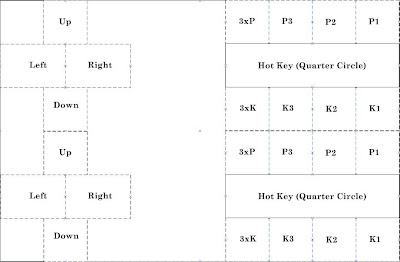
* Touch control (TC) overlay will get displayed when you touch any part
of screen (and will disappear if you press any keypad).
* There are 2 TC clients or listeners on the screen. (upper half and lower half).
They're active all the time but only touched regional TC will get displayed.
* Buttons are from right to left.
- P123 P3 P2 P1
- K123 K3 K2 K1
* There is Hot Key Trigger Button between Punch and Kick button.
======================================
Control
======================================
* coin up - slide finger from bottom to top
* P1 Start - slide finger from top to bottom on the left half of screen
* P2 Start - slide finger from top to bottom on the right half of screen
* Please remember Android doesn't support multi-touch.
So, make sure you lift your other side of finger before touching the screen!
* For shooting game, you can press p1 button for ~2 seconds and release.
This will trigger p1 auto fire until you press p1 button again.
* For fighting game, I've added "Smart Touch Sensing" option which will try to recognize the special move and put it in the memory.
Recognizable move list
-Quarter Circle (color-lit: white)
-Half Circle (color-lit: green)
-Full Circle (color-lit: Red)
For example, if you press d-pad down and fwd, it will make a move list (down-> down/fwd-> fwd) and put it in the memory.
And there will be a green color lit inside all button boxes.
And when you press any punch/kick button, it'll execute move sequences from the memory plus the button.
Memory box will stay unchanged until either a) you make other types of move or b) press any punch/kick button.
* For full circle, you need to make half circle backward and half circle forward. (or visa-verse doesn't matter). This is to allow your character (eg. Zangief) to stay on the ground.
* Hot key button is added between punch and kick buttons.
Direction of hot key is controlled by the right or left button.
Eg. To throw a fireball, tap forward and slide finger from hot key button to any of punch button.
From this position, tap hot key button and tap any of punch button for uppercut.
* To press both P an K buttons, you can slide your finger from P to K (or visa-verse) in the middle area.
CPS2 v1.5.0 update summary
======================================
-Touch control support! (landscape mode only)
-3buttons key (P1+P2+P3 and K1+K2+K3)
-P1 auto fire
======================================
HowTo Touch Control
======================================
Read the following section very carefully...
And practice & practice with 2nd player before giving up!
======================================
Layout
======================================

* Touch control (TC) overlay will get displayed when you touch any part
of screen (and will disappear if you press any keypad).
* There are 2 TC clients or listeners on the screen. (upper half and lower half).
They're active all the time but only touched regional TC will get displayed.
* Buttons are from right to left.
- P123 P3 P2 P1
- K123 K3 K2 K1
* There is Hot Key Trigger Button between Punch and Kick button.
======================================
Control
======================================
* coin up - slide finger from bottom to top
* P1 Start - slide finger from top to bottom on the left half of screen
* P2 Start - slide finger from top to bottom on the right half of screen
* Please remember Android doesn't support multi-touch.
So, make sure you lift your other side of finger before touching the screen!
* For shooting game, you can press p1 button for ~2 seconds and release.
This will trigger p1 auto fire until you press p1 button again.
* For fighting game, I've added "Smart Touch Sensing" option which will try to recognize the special move and put it in the memory.
Recognizable move list
-Quarter Circle (color-lit: white)
-Half Circle (color-lit: green)
-Full Circle (color-lit: Red)
For example, if you press d-pad down and fwd, it will make a move list (down-> down/fwd-> fwd) and put it in the memory.
And there will be a green color lit inside all button boxes.
And when you press any punch/kick button, it'll execute move sequences from the memory plus the button.
Memory box will stay unchanged until either a) you make other types of move or b) press any punch/kick button.
* For full circle, you need to make half circle backward and half circle forward. (or visa-verse doesn't matter). This is to allow your character (eg. Zangief) to stay on the ground.
* Hot key button is added between punch and kick buttons.
Direction of hot key is controlled by the right or left button.
Eg. To throw a fireball, tap forward and slide finger from hot key button to any of punch button.
From this position, tap hot key button and tap any of punch button for uppercut.
* To press both P an K buttons, you can slide your finger from P to K (or visa-verse) in the middle area.
Wednesday, July 22, 2009
Question & Answer
Please post your question here!
For rom file, search for the exact zip file name instead of cps2 rom.
For example, I found this site has a valid rom set for marvel vs capcom.
mvsc.zip
http://www.romnation.net/srv/roms/24059/mame/Marvel-Vs-Capcom-Clash-of-Super-Heroes-US-980123.html
mvscj.zip
http://www.romnation.net/srv/roms/24062/mame/Marvel-Vs-Capcom-Clash-of-Super-Heroes-Japan-980123.html
For rom file, search for the exact zip file name instead of cps2 rom.
For example, I found this site has a valid rom set for marvel vs capcom.
mvsc.zip
http://www.romnation.net/srv/roms/24059/mame/Marvel-Vs-Capcom-Clash-of-Super-Heroes-US-980123.html
mvscj.zip
http://www.romnation.net/srv/roms/24062/mame/Marvel-Vs-Capcom-Clash-of-Super-Heroes-Japan-980123.html
Subscribe to:
Posts (Atom)